Best dream journal apps, compared fairly
By Nora Bennett ·
Nora Bennett writes Notes on dreaming, the Dreamsay journal on dream science, recall, and what your own history can tell you that a dictionary can't.
The best dream journal app is the one you will still open at 6 a.m., and that depends on what you want from your dreams. As of October 2026, Oniri is the most complete toolkit, Dreamsay the one built for speaking dreams aloud, Dreams the cleanest privacy label, and Dream Journal Ultimate the best free all-rounder.
A disclosure before anything else: Dreamsay is made by the team behind this blog. It is judged below on the same criteria as everyone else, and its weaknesses are listed with the same care as anyone’s.
That’s the short answer. The longer one is more interesting, because the apps differ less in what they can do than in which morning they were designed for.
How were these apps judged?
Every listing here was checked on the US App Store on October 15, 2026: price, rating, last update, features, and the privacy label. Ratings and prices change, so the date matters. Privacy labels are written by each developer and not verified by Apple, which is worth remembering whenever one looks unusually tidy.
The criteria run in the order your morning does:
- Capture at waking. Can you get the dream down with your eyes barely open, and by voice? This leads the list for a reason: in a randomized 2019 study, people who spoke their dreams for a week produced reports averaging 310 words, against 101 for those who wrote them (Schredl et al., 2019). In a 2016 phone test, speech ran at 161 words per minute against 53 for the keyboard. The dream does not wait for your thumbs.
- Keeping and review. Search, tags, sync, export. A journal earns its keep weeks later, when you can see across entries.
- Privacy label. What the developer declares it collects, and whether any of it tracks you.
- Interpretation. Whether the app offers one, and whether it draws on a symbol dictionary or on your own history.
- Lucid dreaming tools. Reality checks, guided techniques, dream signs. Essential to some readers, irrelevant to others.
- Price. What the free version actually lets you do.
Eight apps were checked. Six are dream journals; two are general journals that people reasonably use for dreams, and they get their own section below.
Which dream journal apps are worth trying?
| App | Best for | Voice capture | Privacy label (Oct 15, 2026) | Lucid tools | Price |
|---|---|---|---|---|---|
| Oniri | The most complete toolkit | Record and transcribe | Data used to track you; data linked to you | Deepest | Free; Premium subscription |
| Dreamsay | Speaking dreams half-asleep | Voice-first, transcribed on the device | Data not linked to you only | None | Free recording; Premium $6.99/mo or $39.99/yr |
| Elsewhere | Symbols, patterns and images | Not mentioned in listing | Data linked to you (content, search history, user ID) | None listed | Free; Premium $4.99 or $49.99 |
| Dreams: Your dream journal | A minimal, private typed journal | Not mentioned in listing | Data not collected | Dream signs, reality-check reminders | Free; PRO $13.99 one-time |
| Lucidity | Lucid beginners who type | Not mentioned in listing | Data linked to you; ad data not linked | Guides and reminders | Free with ads; PRO $5.99 |
| Dream Journal Ultimate | A free all-rounder | Voice recording with transcription, from a widget | Data not linked to you only | Lessons and reality-check alarms | Free, unlimited entries |
Oniri
Oniri is the Swiss-army knife of the category, and it has earned the reputation: 4.6 stars from 3,836 ratings, and an update on September 30. It records and transcribes, tracks emotions, people and places, draws or generates images of your dreams, and offers an interpretation that asks you follow-up questions. Its lucid dreaming section is the deepest on iPhone, with reality-check reminders, guided WILD, MILD and SSILD tracks, dream goals and dream signs. Export covers PDF, TXT and CSV.
The catch is the privacy label. Oniri’s is the only one in this comparison that declares data used to track you across other companies’ apps and websites (purchases, contact info, identifiers), alongside a long list of data linked to you. If you practice lucid dreaming seriously, Oniri is still the first app to try. Read the label first, and decide with it open.
Dreamsay
Dreamsay is built around a single moment: you wake, tap once, and speak with your eyes barely open. Your iPhone turns the speech into text on the device itself, the recording is deleted once the words exist, and the journal syncs only through your private iCloud. There is no account. Later that morning, a reading draws on your own past entries rather than a symbol dictionary. Your voice never leaves your device.
Now the catches, stated as plainly as everyone else’s. It is new, with a single rating on the US store at the time of writing, which is no evidence either way. It needs iOS 26 and is built for iPhone. It has no lucid dreaming tools at all. Recording and transcription are free without limits, but free readings stop at three to start, then one every seven days; a reading for every dream, with three replies on each, is Premium. If speaking at 6 a.m. is the part you have always failed at, it was made for that problem. If you want lucid training, look up the list.
Elsewhere
Elsewhere is the most beautiful app here and the most interested in pattern. It detects recurring characters, settings and symbols, builds a set of “my symbols” from your own entries, charts what you dream about by week, month or year, and generates an image for each dream. Its interpretations credit two named sources, David Fontana’s symbol writing and thematic insights from the dream researcher Kelly Bulkeley. Its 108 ratings average 4.9.
Two caveats. Its listing doesn’t mention voice capture, so mornings start with typing. And its label declares user content, search history and a user ID as data linked to you. For readers who want to find what their dreams have in common, it is a pleasure. Some extras run on credits, sold separately.
Dreams: Your dream journal
The quiet one. Dreams tracks “signs”, the recurring people, places and objects that also serve as dream signs for lucid practice, shows statistics, lets you draw with a finger or an Apple Pencil, and syncs across devices. There is no interpretation layer in its listing, and no voice capture mentioned. Its 431 ratings average 4.7.
What sets it apart is the label: Data Not Collected, the only one in this comparison. That is the strongest statement a developer can make on the App Store, and for a record as intimate as a dream journal it counts for a lot. PRO is a one-time $13.99, not a subscription, which is its own kind of courtesy.
Lucidity
A clean, typed journal with tags, moods, search and favorites, plus beginner-friendly lucid dreaming guides and gentle reminders. Sync requires signing in. It averages 4.1 from 436 ratings, and its last update was in April.
The free version shows ads, which its label reflects: email, name and user content linked to you, and advertising data collected for third-party advertising. Removing ads costs $1.99, and PRO $5.99. A fine first step into lucid dreaming; less suited to anyone who wants their dream journal free of advertising altogether.
Dream Journal Ultimate
The most generous free tier here: unlimited dream entries at no cost, a Face ID lock, sync, tags, and a Lucid Dreaming Academy that walks through reality testing, MILD, WBTB, SSILD and FILD. A 2026 update added voice recording with automatic transcription, startable from a home-screen widget, which puts it among the few traditional journals that take the 6 a.m. moment seriously. It holds 4.5 stars from 562 ratings and was updated on October 13.
Its label is clean, with nothing linked to you and nothing tracking you. Two things to know: interpretation and generated images are AI features you can hide, and the app has an optional public Dream Wall where dreams can be shared for comments. Sharing is opt-in, but the social layer is part of its character.
What about Apple Journal, Day One or a notes app?
General journals are a reasonable answer, and pretending otherwise would be unfair. Apple’s Journal app is free on every recent iPhone, syncs through iCloud, and transcribes voice recordings automatically, which covers capture better than most dream apps did a year ago. Its label declares only a device ID and usage data, not linked to you. Day One is the most polished journal on the platform, with 4.8 stars from over 118,000 ratings, strong export, and voice recording with transcription (unlimited audio needs a paid tier), though its label links purchases, email, identifiers and usage data to you.
What both lack is anything that knows it is holding dreams: no recurring-symbol tracking, no dream statistics, no interpretation, nothing designed for someone who is not yet fully awake. A notes app has the same gap and adds a keyboard to it. If you already journal daily in one of them, keeping dreams there is simpler than starting over. If your dreams are the reason you are journaling, a voice-first dream journal or one of the apps above will meet you earlier in the morning.
How do you read a dream app’s privacy label?
The range in one category is wide. On the same morning, the labels in this comparison ran from “data used to track you” to “data not collected”, with most apps somewhere between. The categories form a ladder, from most to least exposure:
- Data used to track you. Linked with other companies’ data for advertising or shared with data brokers.
- Data linked to you. Collected and tied to your identity, an account, or a device.
- Data not linked to you. Collected, but not tied to who you are.
- Data not collected. Nothing leaves the app for the developer.
For a voice journal, add one question the label does not answer: where does transcription run? On the device, the recording never has to travel. On a server, a copy of your voice describing your dream exists somewhere else, however briefly. The full method takes about two minutes and is laid out in the guide to telling an AI your dreams.
Which one fits your mornings?
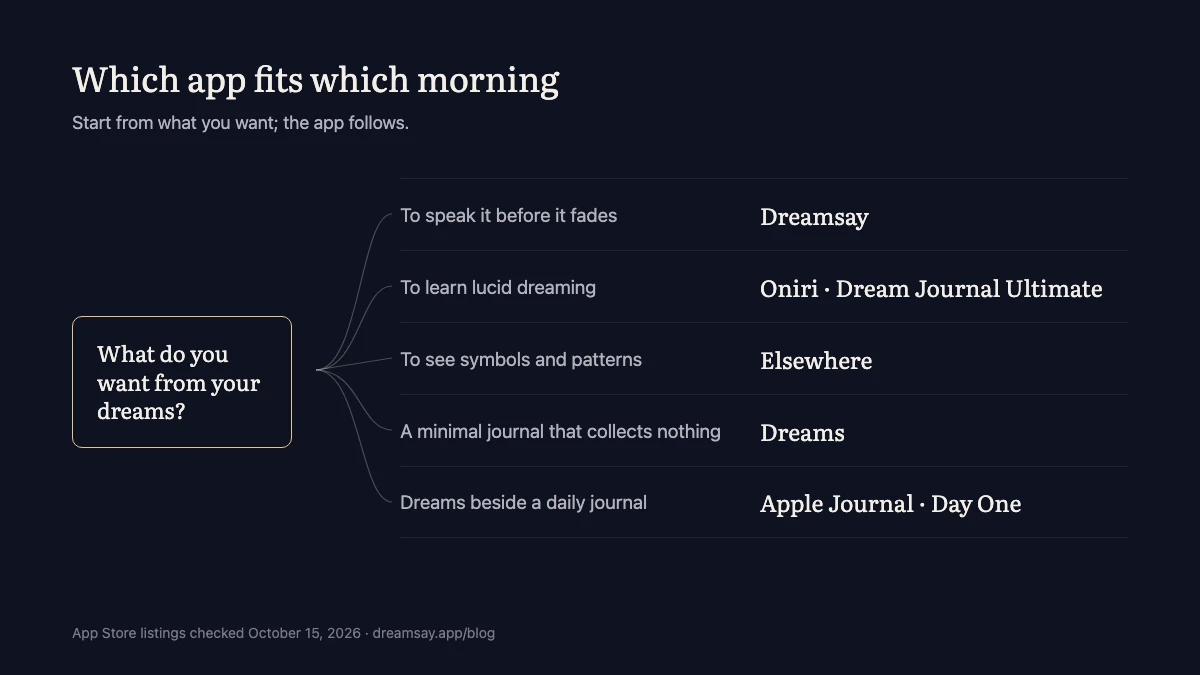
Here is the shortest honest version:
- You want to learn lucid dreaming: Oniri, or Dream Journal Ultimate if you would rather not pay.
- You want to see your symbols and patterns: Elsewhere.
- You want a minimal journal that collects nothing: Dreams.
- You want to speak the dream before it fades, without typing: Dreamsay.
- You already journal daily: Apple Journal or Day One, and keep everything in one place.
The research gives one more reason not to overthink the choice. Aspy’s review of dream-recall studies found that keeping a daily logbook enhances recall itself: people who write their dreams down start remembering more of them. The habit does more than any feature. Keeping the journal is the thing; the app only has to stay out of its way.
So think back to the last dream you lost, the one that was gone before your feet touched the floor. Ask what lost it. If it was the keyboard, choose an app you can talk to. If it was forgetting to open anything at all, choose the one with the reminder you will not dismiss. You already know which morning you have. The right app is the one built for it.
Common questions
What is the best dream journal app?
It depends on what you want from your dreams. As of October 2026, Oniri is the most complete, with lucid tools and interpretation; Dreamsay suits people who want to speak their dreams half-asleep and have them transcribed on the device; Dreams has the cleanest privacy label; and Dream Journal Ultimate is the strongest free all-rounder.
Is there a free dream journal app?
Several. Dream Journal Ultimate lets you enter unlimited dreams for free. Dreams, Lucidity and Elsewhere are free to download with paid upgrades. Apple's built-in Journal app costs nothing and transcribes voice entries. Dreamsay's recording and transcription are free without limits; its readings are limited on the free plan.
What is the best dream journal app for lucid dreaming?
Oniri has the deepest lucid toolkit on iPhone: reality-check reminders, guided WILD, MILD and SSILD tracks, and dream-sign tracking. Dream Journal Ultimate's free Lucid Dreaming Academy teaches the same techniques in lessons, and Lucidity offers a simpler typed journal with beginner guides. Dreamsay has no lucid dreaming tools.
Which dream journal app is the most private?
Judged by the App Store privacy label, Dreams: Your dream journal is the only app in this comparison marked Data Not Collected. For voice journals, also check where transcription runs: on-device transcription means the recording never travels. Labels are self-reported and change with updates, so check the current one before you download.
Can I use Apple Journal as a dream journal?
Yes. Apple's Journal app is free, syncs through iCloud, and transcribes voice recordings automatically, which covers the capture moment well. What it lacks is anything dream-specific: no recurring-symbol tracking, no dream statistics, no interpretation. It works best for people who already journal there and want dreams in the same place.
Sources
- App Store listing, Oniri: Dream Journal, Meanings (Oniri Inc), checked 2026-10-15
- App Store listing, Dream Journal Ultimate (Dream Labs LLC), checked 2026-10-15
- App Store listing, Elsewhere Dream Journal (ELSEWHERE.TO LTD), checked 2026-10-15
- App Store listing, Dreams: Your dream journal (The Lost Project), checked 2026-10-15
- App Store listing, Lucidity - Lucid Dreaming (Shane Curtis), checked 2026-10-15
- App Store listing, Dreamsay (SLEND SOFTWARE FZE-LLC), checked 2026-10-15
- App Store listing, Journal (Apple), checked 2026-10-15
- App Store listing, Day One: Daily Journal & Diary (Automattic), checked 2026-10-15
- Apple, App privacy details on the App Store (developer documentation)
- Schredl et al. (2019), Voice-recorded vs. written dream reports: A research note, International Journal of Dream Research
- Ruan, Wobbrock, Liou, Ng & Landay (2016), Speech Is 3x Faster than Typing for English and Mandarin Text Entry on Mobile Devices, arXiv
- Aspy, Delfabbro & Proeve (2016), Is dream recall underestimated by retrospective measures and enhanced by keeping a logbook? A review, Consciousness and Cognition
Keep reading
What is a voice-first dream journal?
Speaking is the capture, transcription is the record: what a voice-first dream journal is, what the research says, and what to check before you trust one.
Is it safe to tell an AI your dreams?
Whether it's safe to tell an AI your dreams depends on where the dream goes: how to read a dream app's privacy label, and what a private one looks like.
Voice vs. written dream journal: which captures more?
Voice-recorded dream reports run about three times longer than written ones. What the research says about speaking your dreams — and how to get both.
Dreamsay readings — and these notes — are for entertainment and personal reflection, not medical or psychological advice.